[InterKosenCTF 2020] in question
???
解説
配布されたchallを実行するとexec format errorを投げられる
readelfでヘッダを読んでみる
metarin@Metarin-Desktop ..d/Project/CTF/InterCTF/rev/in_question % readelf -h ./chall
ELF Header:
  Magic:   7f 45 4c 46 02 02 01 00 00 00 00 00 00 00 00 00
  Class:                             ELF64
  Data:                              2's complement, big endian
  Version:                           1 (current)
  OS/ABI:                            UNIX - System V
  ABI Version:                       0
  Type:                              <unknown>: 200
  Machine:                           <unknown>: 0x3e00
  Version:                           0x1000000
  Entry point address:               0xa501400000000000
  Start of program headers:          4611686018427387904 (bytes into file)
  Start of section headers:          -5153806823572111360 (bytes into file)
  Flags:                             0x0
  Size of this header:               16384 (bytes)
  Size of program headers:           14336 (bytes)
  Number of program headers:         1024
  Size of section headers:           16384 (bytes)
  Number of section headers:         4352
  Section header string table index: 4096
readelf: Warning: The e_shentsize field in the ELF header is larger than the size of an ELF section header
readelf: Error: Reading 71303168 bytes extends past end of file for section headers
readelf: Error: Too many program headers - 0x400 - the file is not that big
DataがBig Endianになっているのが悪そうなのでLittle Endianに変えてみる
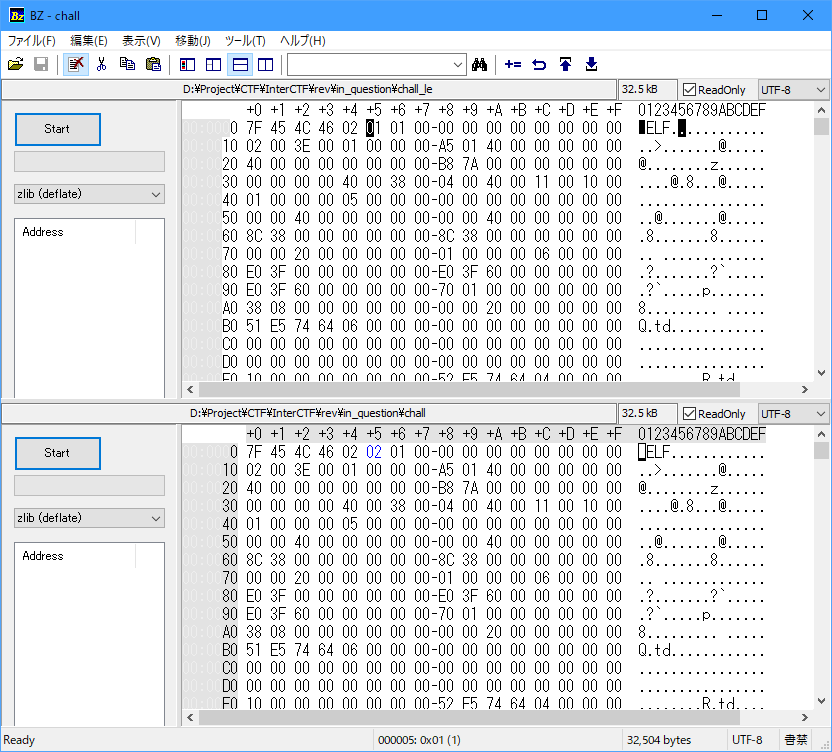
変更したバイナリを実行してみる
metarin@Metarin-Desktop ..d/Project/CTF/InterCTF/rev/in_question % ./chall_le
Usage: ./chall_le <FLAG>
無事実行できるようになったので、Ghidraで解析する
Functionsを見ると、関数名が全て?*nの形になっている
関数名から推測出来ないときは文字列からたどるとスムーズにいくことが多い
なので、"Usage: %s <FLAG>\n"で検索を掛けて、Usageの表示部分を探す
すると、0x40015a周辺でUsageを表示している部分が見つかる
この関数を更に調べてみると、Correct!やWrong...といった表示もしてそうだ
また、どちらを表示するかはuVar1 = ?????(argv[1],??????);で判断しているようだ
??????の要素数=30をflagの長さと仮定してCorrectを表示していそうなアドレスをangrで探索する
#!python

import angr
import claripy

### Settings section

# set input type 'arg' or 'stdin'
input_type = 'arg'
# set text showing at getting the flag
suc_txt = 'Correct!'
# win address in exec
find_addr = 0x40018c
# lose addresses in exec
avoid_addr = [0x40019c, 0x400168]
# replace to exec's name
p = angr.Project('./chall_le')
# mode
KNOWN_LENGTH = 0x1
FIND_SUC_TXT = 0x2
mode = KNOWN_LENGTH
# flag's length
flag_len = 30

### End of settings section

if (mode & KNOWN_LENGTH) == 1:
    flag = claripy.BVS('flag', flag_len * 8)
    argv = [p.filename]
    argv.append(flag)

    if input_type == 'arg':
        state = p.factory.entry_state(args=argv)
    else:
        state = p.factory.entry_state(stdin=flag)

    # bind charcters only printables
    for b in flag.chop(8):
        state.add_constraints(b >= 0x21)
        state.add_constraints(b < 0x7f)

    simgr = p.factory.simulation_manager(state)

else:
    state = p.factory.entry_state()
    simgr = p.factory.simulation_manager(state)

# explore
if (mode & 2) == FIND_SUC_TXT:
    simgr.explore(find=lambda s: suc_txt.encode() in s.posix.dumps(1))
else:
    simgr.explore(find=(find_addr), avoid=(avoid_addr))

# check
if len(simgr.found) >= 1:
    if input_type == 'arg':
        print(simgr.found[0].solver.eval(argv[1], cast_to=bytes))
    else:
        print(simgr.found[0].posix.dumps(0))
else:
    for i in simgr.deadended:
        if i.posix.dumps(1).find(suc_txt.encode()) != -1:
            if input_type == 'arg':
                print(i.solver.eval(argv[1], cast_to=bytes))
            else:
                print(i.posix.dumps(0))
            exit()
    print("Not found")
KosenCTF{d0nt_l3t_th4t_f00l_u}
angrは初心者向け問題によく刺さるのでおぼえておくとしあわせ